Table of content

This equation of a circle calculator lets you quickly find the standard equation of a circle using inputs like center coordinates and radius. Enter your values, and get accurate results instantly for math problems, graphing, or geometry tasks.
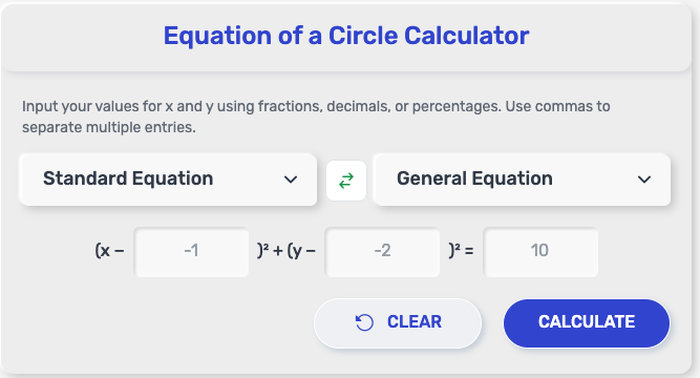
Getting your result takes just a few seconds. The process is simple and works the same whether you're solving a homework problem or preparing data for graphing.
Follow these steps:
Enter the coordinates of the center (h, k)
Input the radius (r) of the circle
Select the output format if available (standard or expanded form)
Click the “Calculate” button
View the equation of the circle instantly on the screen
Once the result appears, you can use it directly for graphing, checking answers, or saving it for later use.
This circle equation calculator is designed to cover the most common circle-related tasks in coordinate geometry. It works with simple inputs and returns results in a clean, usable format.
Here’s what you can do with it:
Generate the standard equation of a circle from a given center and radius
Convert a general circle equation into standard form
Create equations ready for graphing on coordinate planes
Solve typical geometry and algebra problems involving circles
Work with both integer and decimal values for flexibility
Whether you're using a basic circle equation calculator or a more advanced version, the goal stays the same: turn your inputs into a clear equation you can immediately use.
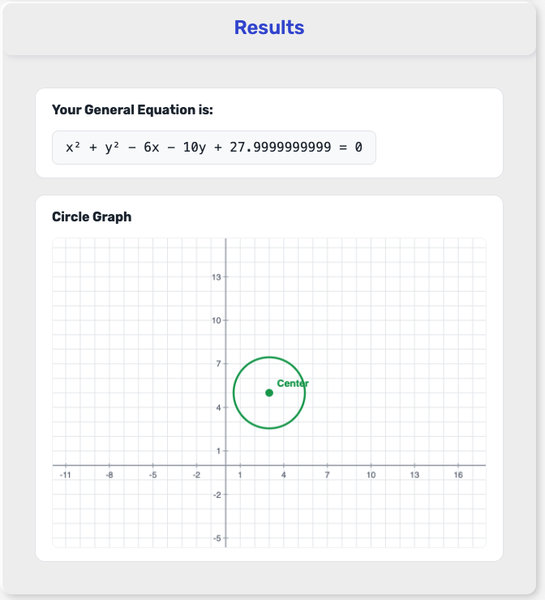
When you use the equation of a circle calculator, the result shows the circle written from the values you entered. In most cases, the answer appears in standard form: (x − h)² + (y − k)² = r².
This result tells you three key things:
(h, k) is the center of the circle
r is the radius
The equation represents every point on the circle
That means the output is not just a math expression. It gives you the exact circle based on your input, so you can use it in a practical way right away.
You can use the result to:
plot the circle on a graph
check a homework answer
rewrite a circle equation in a cleaner form
prepare values for geometry or algebra problems
If the tool also shows r², that is simply the radius squared. For example, if the radius is 5, the equation will end with = 25.
When using a standard equation of a circle calculator, make sure the center and radius are entered correctly, especially if negative coordinates are involved. Even a small sign mistake can change the entire equation.
People often use an equation of a circle calculator in everyday math tasks where speed and accuracy matter. It’s especially useful when you need a quick result without going through manual steps.
Here are some common situations:
Solving coordinate geometry problems in class or exams
Checking answers after working through circle equations by hand
Plotting circles on graphing tools or coordinate grids
Converting a circle equation into standard form for clarity
Working on assignments related to algebra or analytic geometry
This tool fits both quick checks and more detailed problem-solving, whether you're studying or working with geometric data.
A circle can be written in two common ways, and both describe the same shape but in different formats.
Standard form(x − h)² + (y − k)² = r²
Shows the center (h, k) directly
Shows the radius r clearly
Easier to read and graph
Expanded formx² + y² + Dx + Ey + F = 0
Looks like a regular algebra expression
Often appears after expanding brackets
Does not show center and radius right away
How the Two Forms Connect
When you expand the standard form:
(x − h)² + (y − k)² = r²
It becomes:
x² + y² − 2hx − 2ky + (h² + k² − r²) = 0
So the relationship is:
D = −2h
E = −2k
F = h² + k² − r²
When to Use Each Form
Use standard form when you want to quickly read the center and radius
Use expanded form when solving algebra problems or working with equations
If your equation is already in expanded form, a circle calculator can convert it back to standard form in seconds, so you can check the result or plot it more easily.
For a deeper walkthrough of how expansion works and how both forms represent the same circle, you can use the video below as a visual reference before embedding it into your page:
A few small checks can make your results more accurate and save time when using the tool.
Double-check the signs of your coordinates (h, k)
Negative values are common in coordinate geometry, and a missing minus sign can completely change the equation
Make sure the radius is a positive number
The radius represents a distance, so it should never be negative
Use decimal values when you need more precise results
This is especially useful for real-world measurements or detailed graphing
Copy the result directly after calculating
You can paste the equation into graphing tools, assignments, or notes without rewriting it
Keep your inputs consistent
If you're working with a graph or problem, make sure all values follow the same coordinate system
These quick habits make the circle equation calculator more reliable and easier to use in both study and practical situations.
Khan Academy (n.d.) – Equation of a Circle in Coordinate Geometry
https://www.khanacademy.org/math/geometry/analytic-geometry
Math is Fun (n.d.) – Equation of a Circle
https://www.mathsisfun.com/algebra/circle-equations.html
Purplemath (n.d.) – Standard Form of a Circle Equation
https://www.purplemath.com/modules/circleqs.htm
OpenStax (n.d.) – Conic Sections and Circle Equations
https://openstax.org/details/books/precalculus
Yes, you can enter both integers and decimals, and the calculator will process them correctly.
No, just enter the radius value. The calculator will square it and display r² in the result.
That’s completely fine. The calculator will handle negative values correctly in the equation.
Yes, it’s commonly used to verify answers or quickly generate equations during practice.
Equationofacirclecalculator.com was created to make coordinate geometry easier to work with, whether you're solving class assignments, checking equations, or exploring how circles are represented on the Cartesian plane. By helping users move from values to equations more quickly, this tool turns a common geometry task into a smoother and more understandable process.
This tool was built by the equationofacirclecalculator.com team, with contributions from developers, math-focused writers, and educational tool specialists dedicated to creating practical resources that support clearer learning and more confident problem-solving.
We believe math tools should be easy to use, clear in purpose, and dependable in practice.
equationofacirclecalculator.com tool does not require registration or personal information. Any values entered into the tool are used only to generate results and are not stored or shared.
This tool is designed to provide accurate equation results based on the inputs you enter. Even so, users should review outputs carefully when using them for assignments, exams, teaching materials, or other situations where mathematical precision is important.
The calculator is intended for learning, practice, and quick reference. It is meant to support understanding of coordinate geometry and simplify problem-solving, but it should not replace full review or instruction when detailed work is required.
We may improve this tool and revise this Policy from time to time. Any changes will be posted here so the information remains clear, current, and transparent.